Inbox & metadata suggestions
Collect new documents & file them in batches
The inbox is the central entry point for new documents in a Space. Instead of filing files right away, you first collect them in one place and then process them together. This creates an overview and prevents half-finished or inconsistent filing.
Try free for 30 days View pricing
Full range of functions, free for 30 days. No credit card required.
From arrival to filing
- Collect files New documents arrive in the Space inbox, whether through upload, WebDAV, or an AI assistant.
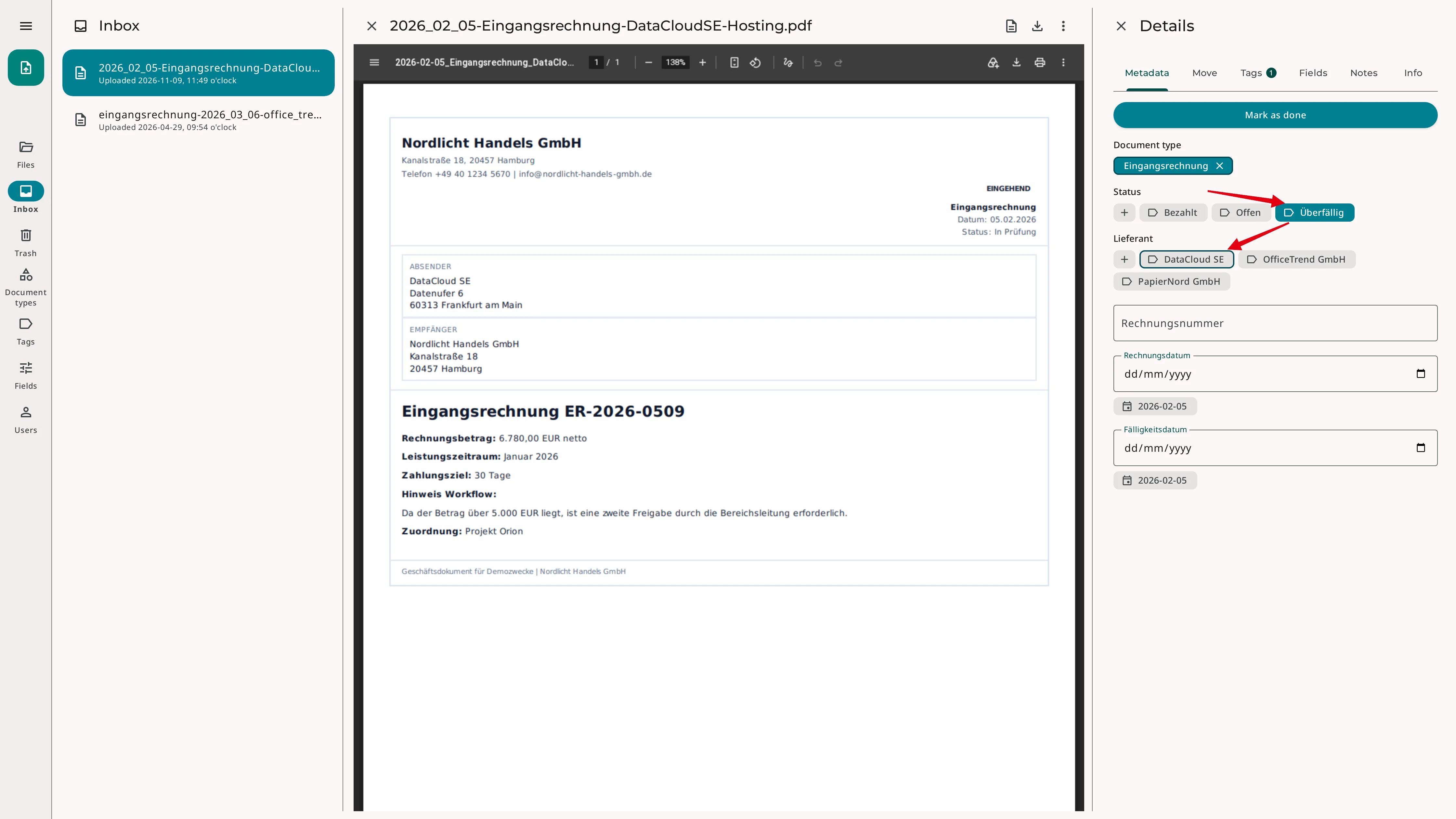
- Select the document type SimpleDMS suggests a suitable document type. You confirm it or choose another one.
- Review metadata You accept, adjust, or discard suggested tags and date values.
- Mark as done Once all metadata is captured, you complete processing, and the document appears in your filing.
The use case «File documents without renaming files» shows the whole workflow with screenshots.
How the suggestions work
SimpleDMS compares the file name and the text of the document with your filing structure. If the name of a document type such as «Incoming invoice» or of a tag such as the supplier appears in the document, it shows up as a suggestion. SimpleDMS offers dates from the text for date fields.
SimpleDMS recognizes the text of scanned documents automatically via OCR after upload. This way, suggestions refer to the content for scans as well.
SimpleDMS suggests
- Document types whose name appears in the text
- Tags mentioned in the text
- Dates from the document
Process in batches, decide yourself
Faster processing for teams
In the inbox, you tag several documents one after another, with less context switching. For recurring documents such as invoices, delivery notes, or receipts, this saves a lot of time.
You stay in control
A suggestion remains a suggestion. You accept, adjust, or discard it, while routine tasks get faster.
Fewer filing errors
The inbox and suggestions reduce missing fields, inconsistent naming, and wrong document types. Better metadata directly improves later finding and filtering.
Frequently asked questions
Does SimpleDMS use an AI service for the suggestions?
No. The suggestions are based on matching the document text against the names of your document types and tags in SimpleDMS. If you also want to work with an AI assistant, you connect it through MCP when needed.
How do I get better suggestions?
Name document types and tags the way the terms appear in your documents. A supplier tag with the company name printed on the invoice, for example, appears as a suggestion as soon as SimpleDMS finds the name in the text.
Why are some suggestions based only on the file name?
While text recognition for a document is still running, SimpleDMS uses only the file name. The same applies to files that are too large for text recognition. SimpleDMS shows a notice in this case.