How SimpleDMS works
Metadata instead of rigid folder structures
In SimpleDMS, you describe documents with metadata, meaning details such as document type, supplier, or invoice date. After a short introduction, this lets you file documents efficiently and find them again quickly. Its core is tags with fields and workspaces (Spaces) for shared or private access.
Try free for 30 days View pricing
Full range of functions, free for 30 days. No credit card required.
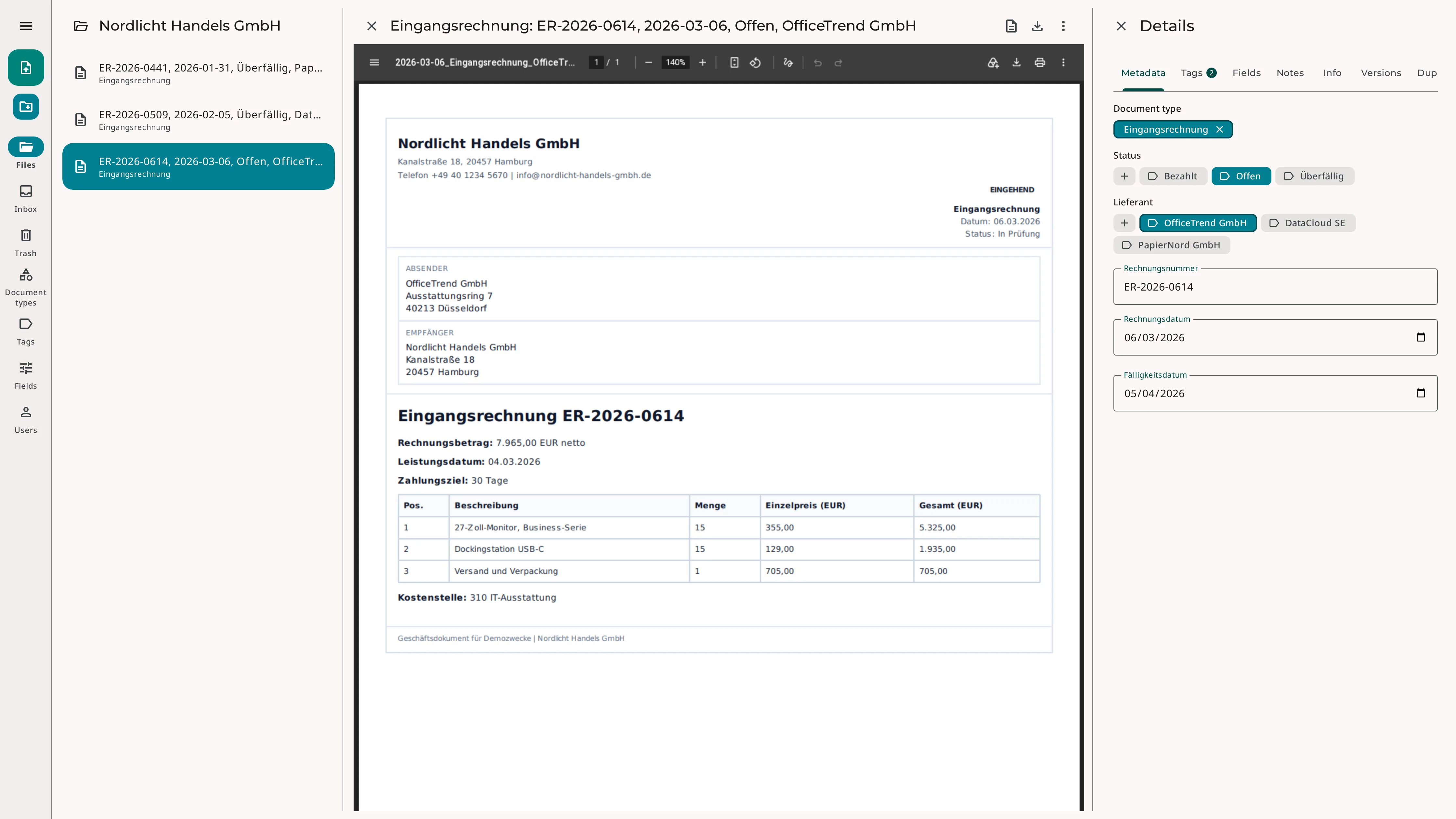
Why metadata helps in daily work
Instead of forcing documents into the «right» folder structure first, you describe each document with a document type, tags, and fields. This creates a clear yet flexible structure that reduces manual filing work and improves retrieval.
You no longer have to decide which of several suitable folders a document belongs in. This is especially helpful for documents that would have to exist more than once in a classic file structure. Metadata simplifies and speeds up finding, organizing, and evaluating documents.
One document, many search criteria
- Company
- Project
- Year
- Status
Building blocks of your filing
SimpleDMS has a simple yet powerful tagging system. Together with fields, it enriches documents with metadata.
Document types
Document types such as «Invoice», «Contract», or «Quote» define the framework. They specify which information is relevant for a kind of document and organize the tags.
Tags
Tags provide flexible assignment and add context without rigid folder logic. Besides simple tags, there are super tags and tag groups.
Fields
Fields hold structured values such as dates, amounts, or reference numbers. This lets you filter documents precisely.
Combined, they create fast and consistent filing. Similar documents are captured the same way and stay easy to find months later.
Tag documents in seconds
Document types speed up tagging. If you configure the document type «Invoice» with the relevant tag groups and fields, you get a clear view while tagging and categorize each document in a few seconds.
For fast tagging of new documents, the inbox lets you process them in batches.
Example: document type «Invoice»
- Tag group «Tax year»
- Tag group «Person»
- Tag group «Invoice type»
- Field «Receipt date»
- Field «Invoice amount»
Workspaces (Spaces)
Spaces create shared and private workspaces. You set them up for exchanging documents in project groups, for working with fiduciaries, customers, and suppliers, or as personal workspaces.
Spaces are also part of the permission system. For example, you define who has write and who has read permissions for the documents in a Space.
Spaces work well for
- Project groups
- Exchange with fiduciaries
- Exchange with customers & suppliers
- Personal workspaces
Frequently asked questions
Can I keep working with folders?
Yes. Filing without folders and file names is optional. If you do not (yet) want to give them up, you keep using folders and add metadata to the documents.
Do I have to set up all document types myself?
No. When you create a Space, built-in document types are available as templates. You use them right away or adjust them later.
Do document types and tags apply to all Spaces?
No. Each Space uses its own document types and tags. People without access to a Space therefore do not see its tags either.
How to work with SimpleDMS
First steps
The guide gives a good impression of how to work with SimpleDMS.
Read the guideVideo guide
First steps with SimpleDMS as a video, in German with translated subtitles.
Watch on YouTubeTagging documents
Why tagging offers more flexibility than traditional file structures.
Read the article